 PetYou
PetYou User Guide
This public version focuses on user-visible capabilities, usage paths and responsible-use boundaries.
graph TD
  A[PetYou] --> B[AI reasoning]
  A --> C[Digital twin]
  A --> D[Connection layer]
  A --> E[Agent Butler]
  E --> B
  E --> C
  E --> D
How to read this guide
You can begin by understanding a pet, or enter through care, social connection, creation or real-world services. Agent Butler carries relevant pet context, owner permissions and the current situation into the next step when appropriate. Health, payment, external service and in-person actions remain subject to user confirmation.
PetYou – Cherish Your Pet
Product User Manual and Project Documentation
1. Understanding PetYou in One Sentence
Use AI to understand pets, use Digital Twin Layer to accompany pets, use maps and services to transform online understanding into offline action, and use community, creation, and charity to sustain and grow pet relationships.
PetYou's core goal is not to make users stay in the app longer, but to enable users to obtain reliable, executable, and trackable answers more quickly when facing questions like "what does my pet need," "what should I do now," "where can I find help," and "how can I preserve this relationship."
Therefore, PetYou's product experience can be summarized as a continuous cycle:
Create pet profile
      ↓
Understand pet emotions, health & behavior
      ↓
Get AI recommendations and action paths
      ↓
      ↓
Complete care, social, creative or charity actions
      ↓
Accumulate records, memories & digital pet assets
      ↓
Make next companionship more understanding of you and your pet
2. Three Core Layers of PetYou
PetYou can now be understood through three interconnected product layers:
2.1 AI Reasoning Layer: Translation, Health, Behavior & Creation
The AI Reasoning Layer answers questions like "what might my pet be expressing," "how should I care for them," and "how to make daily life more interesting." It is not an isolated chatbot, but a set of AI capabilities divided by scenario:
| AI Capability | Problem Solved | Typical Entry | Current Boundaries |
|---|---|---|---|
| Pet Language Translation | Transforms sounds, photos, movements, and context into entertaining interpretations | AI Tools > AI Pet Translation | Research preview and entertainment feature, not claiming scientifically validated language translation |
| AI Pet Doctor | Organizes symptoms, risks, knowledge, and next steps | AI Tools > AI Pet Doctor | Health reference and triage assistance, not a substitute for veterinary diagnosis |
| Behavior & Training | Explains body language, generates training recommendations and plans | AI Tools > AI Smart Training | Requires integration with pet's actual situation; serious behavioral issues should involve professionals |
| Nutrition & Recipes | Provides dietary references, recipes, and restocking suggestions based on pet profile | AI Tools > AI Recipe Recommendations | Nutrition reference, not a substitute for veterinary or nutritionist prescriptions |
| AI Content Creation | Generates post captions, stories, short video scripts, emojis, and music | AI Tools > AI Content Creation | Generated content requires user confirmation; commercial copyright not automatically guaranteed |
| Art Portraits & 3D | Transforms photos into art portraits, 3D models, and virtual avatars | AI Tools > AI Art Portraits/3D Models | Subject to material quality, model services, quotas, and build configurations |
| AI Agent | Dispatches questions to expert agents for health, nutrition, behavior, shopping, insurance, services, creation, adoption, etc. | Global Agent Concierge | Makes no unverified promises about external inventory, prices, appointments, or medical outcomes |
The core value of the AI layer is "interpretation" and "decision support," not giving users another chat window. It must be able to continue guiding users to reminders, maps, medical institutions, pet cards, malls, service bookings, or creative tools after answering.
2.2 Digital Twin Layer: Pixel Pets, 3D Pets & Virtual Worlds
The Digital Twin Layer enables pets to have a continuous "digital identity" and "sense of companionship" within the app. It consists of several levels:
- Pet Profile Layer: Name, species, breed, age, gender, weight, personality, health records, photos, and user-supplemented information.
- Personality Narrative Layer: AI generates pet personality profiles, inner monologues, personality keywords, creative prompts, and social expressions based on photos and data.
- Pixel Companion Layer: Pixel electronic pets have local states including mood, hunger, cleanliness, energy, intimacy, experience, visit count, and interactive behaviors.
- Visual Asset Layer: AI art portraits, emojis, short videos, pet songs, pet MVs, and 3D models.
- Virtual Space Layer: 3D pet displays, 3D worlds, virtual playgrounds, and other immersive entries.
- Memory Layer: Organizes pet's daily life, locations, photos, and important milestones into a reviewable timeline.
Digital Twin is not about creating a virtual pet detached from reality, but about keeping the real pet's growth, care, and relationships close to the user. It must be clear: while pixel pets and multiple 3D/creation entries already exist in the current public release, capabilities like "complete cloud-based Digital Twin profiles, cross-device sync, automatic hardware data integration" should still be based on actual environment, interfaces, and data switches.
2.3 Connection Layer: O2O, Maps, Community & Service Networks
The Connection Layer transforms online understanding into offline action, including:
- Maps and nearby services: hospitals, pharmacies, pet-friendly locations, walking routes, footprints, and geographic memories.
- Medical services: emergency care, nearby hospitals, medical records, reminders, insurance education, prescription records, and future telemedicine/delivery capabilities.
- Community relationships: posts, comments, likes, favorites, follows, events, carrier pigeons, and walking buddies.
- Pet adoption: public adoption information, application records, rehoming posts, and responsibility reviews.
- Supply and mall: local merchant priority, external CPS as supplementary product discovery, price comparison, and redirects.
The key principle of the Connection Layer is "reality first": display clear empty states, permission states, or service unavailable states when there's no real data; test samples must have obvious labels; cannot use fictional merchants, hospitals, inventory, prices, users, or successful appointments to fill the experience.
3. Product Vision and Current Product Boundaries
The complete vision proposed by users can be summarized into seven long-term value chains:
- Pet Bonding: Adoption, responsibility matching, and potential future compliant pet transaction information services.
- Smart Pet Dating: Match walking buddies based on location, pet personality, breed, size, age, and activity level.
- Emotional Communication: AI pet language, emotion understanding, voice interaction, and expression assistance between people and pets.
- Emotional Value: AI personality profiles, art portraits, songs, MVs, emojis, short videos, digital pets, and derivative merchandise.
- Love and Care: AI health references, medical institutions, medical records, insurance education, boarding, lost and found, and reminders.
- Loving Feeding: Stray animal material support, feeding records, foster funds, and potential future points or asset mechanisms.
- End-of-Life Care: Pet funeral services, memorial spaces, last wish records, and emotional support services.
Agent will identify the current scenario, read user-authorized pet context, dispatch professional agents, and return executable next steps. Its essence is a hub coordinator between the Connection Layer and AI Reasoning Layer.
4.3 Other Business Role Surfaces
In addition to the five main user tabs, the project includes three types of business surfaces:
- System-Level Pages: Login, registration, welcome page, password reset, email verification, privacy terms, system version, and error/degradation states.
5. Core User Journeys
5.1 New User First Entry
- User enters welcome page, sees PetYou brand, tagline, three core capability cards, and language switcher.
- Clicks "Start Exploring," system records welcome page read status, enters five main tabs.
- Non-logged-in users can browse some pages, but social, AI, personal pets, publishing, messages, favorites, history, and full Agent capabilities will require login based on specific scenarios.
- After login, user can create their first pet, filling in species, breed, age, weight, gender, photos, and description.
- Agent will adjust health, nutrition, behavior, shopping, and creation recommendations based on pet profile.
5.2 Creating Pet to Forming Digital Identity
Create pet
  → Upload avatar and basic profile
  → Supplement personality, health, and lifestyle information
  → Generate AI personality profile
  → Generate art portraits/emojis/songs/3D models
  → Set up pixel electronic pet
  → Share to community or save as pet memory
The value of this journey is transforming "pet information entry" into "pet identity establishment." The more complete the profile, the higher the degree of personalization for health reminders, training recommendations, creation prompts, and Agent.
5.3 Health Issue to Action Recommendation
User describes symptoms or behavioral changes
  → Agent judges scenario and urgency level
  → AI health agent provides risk alerts and information to observe
  → Non-urgent: Enter symptoms, health records, reminders, or knowledge base
  → Needs offline: Open nearby hospital/pharmacy map
  → Major risk: Enter emergency page, provide real POI, phone, and navigation
5.4 Daily Supplies to Purchase Recommendations
User presents product need
  → Agent reads pet species, health, region, and delivery country
  → Prioritize searching local merchants or real O2O supply
  → When no suitable local results, display controlled external CPS candidates
  → User views product details, price comparison, or saves
  → User actively confirms before redirecting to external platform
PetYou does not automatically make payments, place orders, upload sensitive data, or promise external platform inventory and after-sales on behalf of users.
5.5 AI Creation to Community Sharing
- User uploads one or more pet images.
- Select content type: post caption, story, emoji, song, MV, short video, art portrait, or 3D model.
- AI generates candidate content based on pet profile and user theme.
- User previews, edits, favorites, downloads, or shares.
- Before publishing to community, user can add text, tags, images, and location.
- Community content supports likes, comments, favorites, follows, shares, and translation.
5.6 Adoption Matching to Responsibility Application
Browse adoption information
  → View pet profile and rehoming requirements
  → Agent assists in understanding compatibility conditions and responsibilities
  → Fill out adoption application
  → Wait for rehoming party/institution processing
  → View application records and status
  → Contact relevant parties when status allows
Adoption is not instant purchase. The system should prioritize animal welfare, information authenticity, application responsibility, and manual review.
6. Agent Concierge: PetYou's Core Middleware
6.1 Product Definition of Agent Concierge
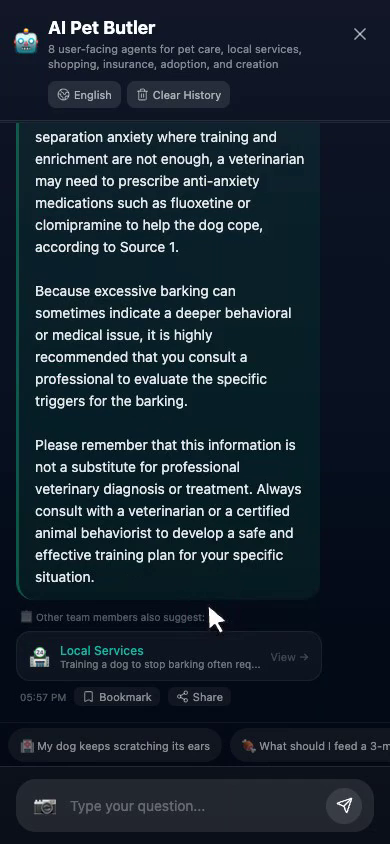
Agent Concierge is PetYou's unified understanding, routing, and action layer. It breaks down a user's single question into four continuous steps:
- Understanding: Identifies user intent, pet context, current page, and region.
- Division of Labor: Selects health, nutrition, behavior, shopping, creative, insurance, service, or adoption agents.
- Decision: Generates explanations, risk warnings, recommendations, and next actions.
- Execution: Opens relevant pages, sets reminders, displays maps, enters the mall, generates content, or initiates service processes.
Therefore, Agent is not simply a "Q&A layer," but a combined system of "Q&A + scene routing + action cards + result write-back."
6.2 Complete Invocation Chain of Agent
User inputs text/voice/image
        ↓
        ↓
Read current page, language, region, pet, and authorization context
        ↓
Scene router identifies scene
        ↓
Select a primary agent and necessary auxiliary agents
        ↓
Call health intelligence interface or general Agent interface
        ↓
Parse text, references, candidate results, and owner-confirmed next steps action markers
        ↓
Safety filtering: medical, location, price, inventory, external links, permissions
        ↓
Generate explanations, recommendation cards, action cards, and follow-up questions
        ↓
After user confirmation, execute navigation, reminders, favorites, sharing, or external jumps
        ↓
Record session summary, user feedback, and reusable memory
6.3 Eight Professional Agents
| Agent | Primary Responsibilities | What It Can Help Users Do | What It Explicitly Cannot Do |
|---|---|---|---|
| Health Agent | Symptom organization, risk stratification, emergency pathways, nearby hospitals, health records | Determine if immediate medical attention is needed, organize consultation questions, open emergency/hospital/records/reminders | Cannot diagnose, prescribe medication, promise cure, or replace veterinarians |
| Nutrition Agent | Food safety, feeding plans, recipes, and restocking needs | Generate dietary references based on pet profiles, connect to recipes or supply searches | Cannot treat general advice as prescriptions, cannot recommend dangerous ingredients without basis |
| Behavior Agent | Body language, training methods, behavior plans | Explain barking, anxiety, socialization, housebreaking, recall, and other training issues | Cannot replace professional behavior modification, cannot oversimplify complex aggression behaviors |
| Shopping Agent | Pet supplies, emergency restocking, local supply, and external candidates | Search locally first, then conduct controlled external product discovery and price comparison | Cannot fabricate inventory, prices, delivery times, partnerships, or after-sales service |
| Creative Agent | Copywriting, stories, songs, MVs, portraits, videos, and memes | Recommend the most suitable creative entry based on pet personality and materials | Cannot automatically guarantee commercial copyright, portrait authorization, or platform review approval |
| Insurance Agent | Insurance concepts, coverage scope, waiting periods, exclusions, and materials | Help users understand policy fields, prepare questions, and enter insurance education pages | Cannot promise underwriting, claim amounts, or review results |
| Local Service Agent | Hospitals, pharmacies, boarding, dog walking, pet-friendly locations, and local events | Open maps, institution directories, service pages, or appointment application pages | Cannot promise business hours, availability, prices, or successful appointments without confirmation |
| Adoption Agent | Adoption process, responsibility matching, welfare, and application preparation | Help users understand rehoming requirements, pre-submission preparation, and view applications | Cannot guarantee application success, bypass manual review, or turn adoption into transactions |
6.4 Scene Routing
Agent enters different scenes based on the page and user question. The following typical scenes are already defined in the current public release:
| Scene | Default Agents | Typical Actions |
|---|---|---|
| Medical Overview | Health, Nutrition, Local Service | Triage, nearby hospitals, appointment applications, emergency, health reminders, open pet card |
| Medical Emergency | Health, Local Service | Emergency page, nearby hospitals, phone, navigation |
| Feeding Abnormalities | Nutrition, Health, Local Service | Feeding reminders, medical triage, instant retail, price comparison |
| Stray Animal Feeding | Shopping, Nutrition, Local Service | Supply search, price comparison, nearby stores, open products |
| Adoption Matching | Adoption, Behavior, Health | View adoption, open pet card, responsibility reminders |
| Daily Shopping | Shopping, Nutrition, Local Service | Instant retail, price comparison, nearby stores, open/save products |
| Creative Sharing | Creative, Behavior | Generate content, sharing recommendations |
| Local Events | Local Service, Adoption | Map navigation, event recommendations, share routes |
| Insurance Education | Insurance, Health | Open insurance page, view pet profile, set reminders |
6.5 Agent Action Cards
Agent responses can include action cards. Action cards are not automatically executed commands, but next steps that users can click to confirm:
| Action | Execution Result |
|---|---|
Find local merchants | Opens map or local merchant results, carrying query terms and scene source |
Find nearby veterinary care | Opens medical institution directory or map, displaying real POI, phone, and navigation entry |
Find nearby supplies | Enters mall/product search, using pet and region context to optimize query |
Compare product information | Enters product comparison or CPS candidate page |
Open product information | Opens external product page after confirmation, clarifying external inventory, price, and after-sales boundaries |
Save recommendation | Saves to favorites after strict validation, does not save untrusted links |
Health triage reference | Enters symptom/triage page to help users organize information |
Open pet profile | Opens pet profile and health context |
Share recommendation | Opens sharing preview, shares after user confirmation |
Request a service | Enters dog walking, daycare, boarding service page, or appointment center |
Request medical care | Enters medical appointment application only when institution capability and service pathway allow |
Open emergency support | Enters emergency page using real location and institution information |
Set a reminder | Sets local or cloud reminder, feedbacks sync result |
Create content | Jumps to AI creative tools, passing scene and material intent |
View adoption information | Enters adoption list or adoption details |
Open insurance education | Enters insurance education and coverage explanation page |
Open map or navigation | Opens navigation/map based on clear location or service target |
Find a walking companion | Opens location-based pairing, searching for walk buddies by region, pet personality, and activity preferences |
Open Pigeon Post | Opens Pet Post mailbox to view in-transit, received, and sent pet letters |
Write a pet letter | Enters letter writing page based on pet profile and theme to create a slow social pet letter |
Set Pigeon Post preferences | Sets Pet Post region, privacy, stranger letters, distance, and theme preferences |
6.6 Agent Context
With user authorization and data availability, Agent can read:
- Current pet: name, species, breed, age, weight, vaccinations, deworming, allergies, health, and personality information.
- Current user: login status, language, region, conversation history, favorites, and reminders.
- Current scene: current route, page type, entry source, functionality user is browsing.
- Current environment: location permissions, map service areas, delivery countries, network and service availability.
- Current materials: photos, sounds, text themes, creation history, and user selections.
Agent should not guess user's city, landmarks, inventory, prices, delivery times, or institution partnerships. Without region and location, it should explicitly ask users to select a region or fall back to general knowledge answers.
6.7 Agent Memory and Sessions
Agent conversations support the following capabilities:
- Current session history and quick questions.
- Cloud session summaries and local cached history.
- Form reusable memory through user feedback and pet context.
- Clear local and cloud history.
- Record events such as "pet context used," "question submitted," "routing completed," "recommendations displayed" for quality analysis.
- Can expand auxiliary agent suggestions in conversations, but does not pile all experts on users at once.
6.8 Agent Trust and Safety
Agent middleware must follow four principles:
- Medical Caution: Health advice, emergency, and appointment applications are stratified; all diagnostic and medication conclusions preserve professional boundaries for human experts.
- External Transparency: External products and services are displayed as external candidates; users know they will leave PetYou before clicking.
- User Confirmation: Does not automatically make payments, place orders, publicly share, or upload sensitive materials.
- Real Data: Does not use fake institutions, products, inventory, prices, distances, ratings, or appointment statuses to replace real results.
7. Home: Discovery, Search, and Daily Action Entry
Route: the relevant feature entry Product Responsibility: Allow users to see pet content worth paying attention to today, AI tools ready to use immediately, and next-step actions from a single page.
7.1 Top Identity Area
- Display the PetYou brand.
- Show login entry for non-logged-in users; display user status after login.
- Bell icon enters the notification and message panel, with unread count driven by real data.
- When the service is unavailable or the user is not logged in, the panel displays a clear status rather than silently showing a blank screen.
7.2 Search and Trends
- Search community content, pet topics, and related information.
- Use vector search and cross-language search capabilities to support content discovery in different languages.
- Non-Chinese content can provide translation or localized display.
- Trending topics can directly enter AI content creation with the topic as creative context.
7.3 Six Home Shortcuts
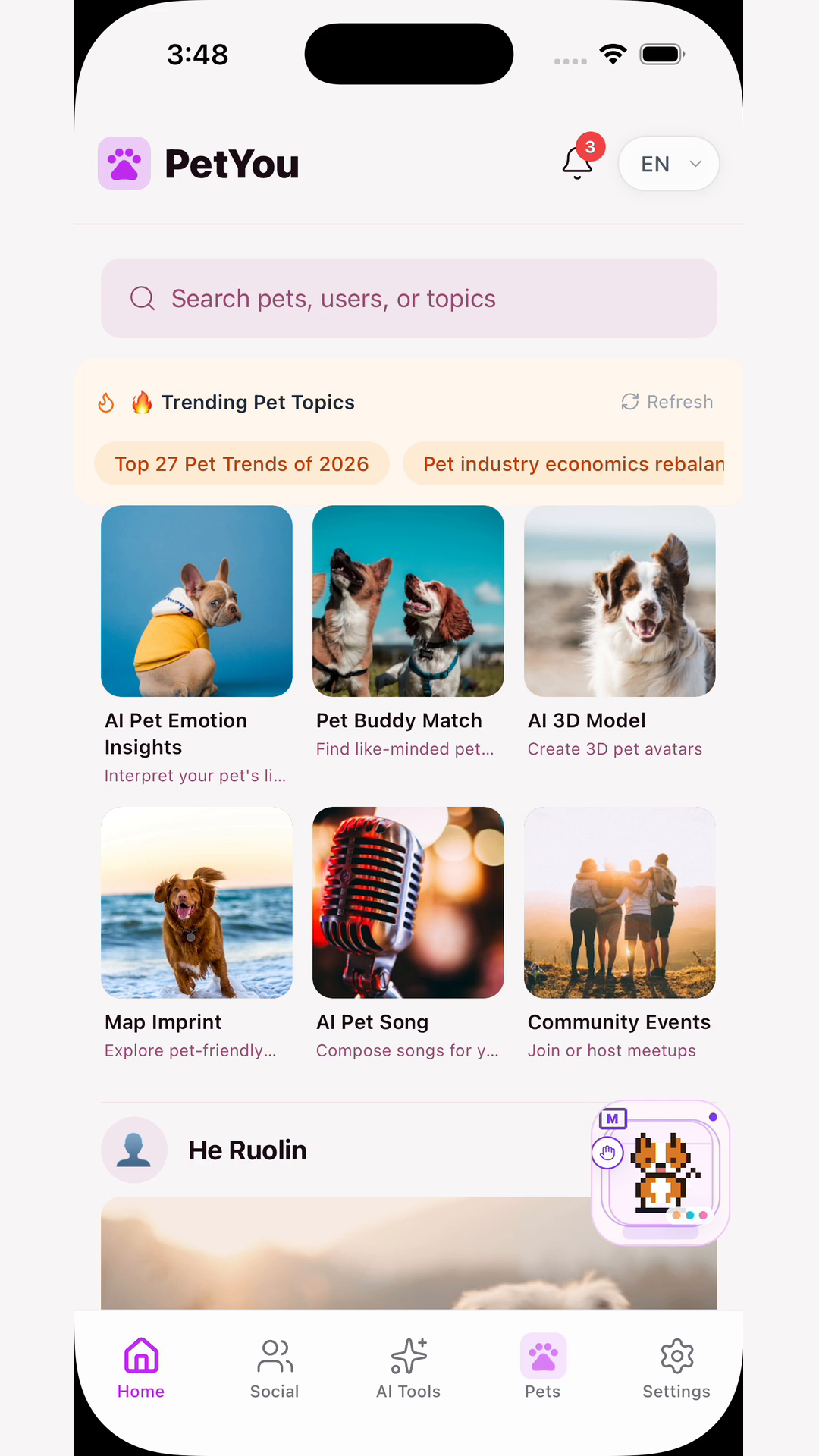
| Shortcut | Function Description |
|---|---|
| AI Pet Emotion Interpretation | Voice recording, photo, or contextual input to get playful emotion explanations and reaction feedback entry |
| Pet Walking Buddy/Friend Matching | Enter matching based on pet profiles and local scenarios |
| AI 3D Model | Generate viewable 3D assets based on pet photos |
| Map Footprints | View pet-friendly locations, map traces, and local exploration entry |
| AI Pet Song | Generate lyrics and songs based on pet name, personality, and mood |
| Community Events | Browse and participate in pet-themed events |
7.4 Community Feed
- Default paginated loading; continue loading when approaching the bottom.
- Support likes, comments, favorites, sharing, and opening post details.
- Images, avatars, translations, and localized content are displayed based on real data.
- Network errors, empty data, and retry states are clearly visible.
- Search and community feed share cross-language and vector retrieval capabilities.
7.5 Home Value Proposition
The home page is not simply a content waterfall, but a combination of "content discovery + AI entry + local action": users see a post and can enter creation; see a topic and can ask the Agent Concierge; see a location and can open the map; see a pet issue and can enter health, training, or nutrition tools.
8. Social Tab: Location-Based Matching, Pet Post, Community & Events
Route: the relevant feature entry Product Responsibility: Help users build safe, authentic, and sustainable relationship networks around their pets, using two different-paced social mechanisms to address two types of needs: "I want to take action together right now" and "I want to slowly get to know friends from afar."
PetYou's social features don't put everyone into the same "nearby people" list, but explicitly split into two relationship products:
- Location-Based Smart Matching: Solves the immediate relationship problem of "right now, nearby, what can we do together," focusing on joint dog walking, play, activities, and offline actions.
- Pet Post (Slow Social): Solves the asynchronous relationship problem of "cross-distance, low-pressure, gradual trust-building," focusing on letter writing, waiting, themed exchanges, and pet story sharing.
Both can use pet profiles and AI recommendations, but don't share the same product goals: location-based matching emphasizes real-time accessibility and action efficiency; Pet Post emphasizes temporal rhythm, ritual, boundaries, and emotional value.
8.1 Social Tab Main Structure
| Feature Card | Route/Entry | Detailed Capabilities |
|---|---|---|
| Local Activity Agent | Scenario local_activity | Recommend activities, locations, adoption experts, or authentic service entries based on current location and local service resources |
| Location Matching | SwipeMatching, the relevant feature entry, the relevant feature entry | Find dog-walking companions based on location, pet profile, personality, size, age, activity level, and social intent |
| Pet Post Mailbox | the relevant feature entry | View letters in transit, received, and sent; enter letter writing, replies, journey, and mailbox settings |
| Pet Post Settings | the relevant feature entry | Set region, whether to display city, stranger letters, distance range, themes, cross-border consent, and pause status |
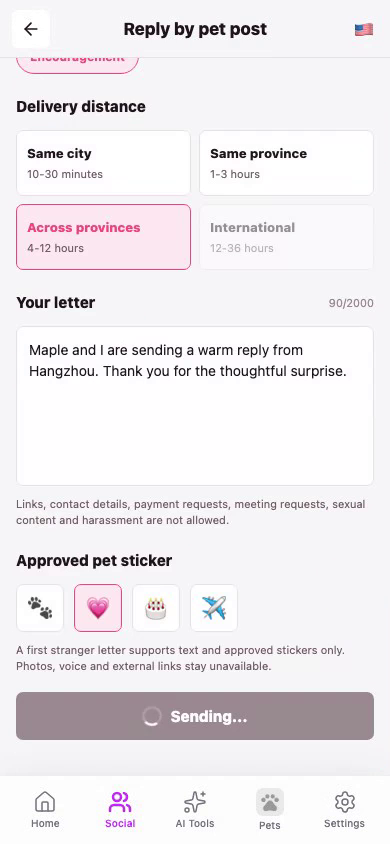
| Pet Post Compose | the relevant feature entry | Choose friend/stranger/theme mode, select pet, theme, distance, stickers, and send letter |
| Pet Post Journey | the relevant feature entry | View approximate route of pet letter, in-transit status, estimated arrival time, and privacy notes |
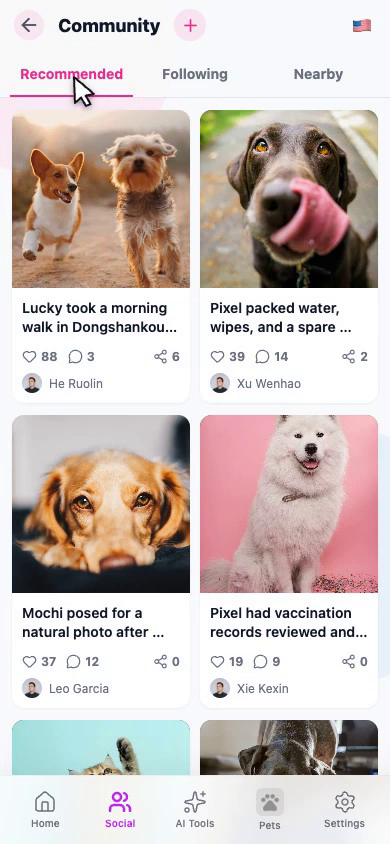
| Community | the relevant feature entry | Recommended, following, nearby content feeds; post, comment, like, share, and translate |
| Community Events | the relevant feature entry | Event list, details, participants, create events, and event interactions |
| Pet-Friendly Travel | the relevant feature entry | Find pet-friendly locations and services through official/authentic location resources |
| Map & Footprints | the relevant feature entry | Map exploration, tracks, footprint details, geographic memory, and community map |
8.2 Location-Based Smart Matching: Immediate, Nearby, Act Together
8.2.1 Product Positioning
Location-based matching is PetYou's "immediate social and offline action" product. It answers the question:
"Today, right now, or these few days, within my acceptable distance, is there a pet owner and a pet suitable for us to walk, play, or participate in activities together?"
It's not traditional general-interest socializing, nor simply arranging users by geographic distance, but simultaneously incorporating "distance accessibility" and "pet compatibility" into recommendations. It's closer to a smart companion marketplace in pet scenarios: first find suitable people and pets, then let both parties decide whether to chat, meet, or complete an activity together.
8.2.2 Recommendation Inputs
Location-based matching can use the following information for recommendations:
- Location & Distance: Current region, maximum acceptable distance, whether to display distance, whether to allow nearby recommendations.
- Pet Attributes: Species, breed, size, age, gender, activity level, and health/social restrictions.
- Personality & Behavior: Outgoing, cautious, likes chasing, likes quiet, can get along with other pets, training stage, etc.
- Activity Preferences: Dog walking, playing, training, pet cafés, pet-friendly locations, community events, etc.
- Time & Lifestyle: Usual time slots, exercise frequency, routine, and acceptable activity pace.
- Social Goals: Meet pet friends, find dog-walking companions, join activities, short-term playmates, or long-term pet social relationships.
- User Safety Preferences: Only view verified profiles, whether to allow messages, whether to display last active time, whether to accept stranger contact.
The code-side matching service retrieves recommendations from the relevant feature entry, using user profiles, pet profiles, recommendation scores, and distance information to generate cards; users express like / pass through left/right swipes or buttons, which are written to the relevant feature entry after login. When both parties like each other, a match record is formed, then entering the match list and chat path.
8.2.3 User Flow
Open location matching
  → Authorize location or select region
  → Set pet and social preferences
  → View recommendation cards
  → View distance, pet profile, personality, and common preferences
  → Like / Pass / Return to adjust
  → Form match after mutual likes
  → Enter chat or arrange activity
  → Choose public location and time
  → Rate match quality after completing walk/activity
Users see recommendation cards, not the other party's precise real-time location. Recommended distance can be a privacy-protected approximate distance; users can only further share specific meeting points after both parties confirm and enter activity communication.
8.2.4 Recommendation Card Information
Location matching cards can display:
- User avatar, nickname, and public bio.
- Pet photo, name, species, breed, age, and personality description.
- Approximate distance or region label.
- Match score and explainable match reasons, such as "appropriate size," "both enjoy morning walks," "similar activity level."
- Common activity preferences and common pet interests.
- User-permitted information such as whether verified, online, or recently active.
Match score is a recommendation sorting aid, not a guarantee of relationship success rate, safety certification, or real-world identity credibility. The system must avoid expressing "92% match" as a scientific conclusion.
8.2.5 Safety Boundaries for Immediate Matching
- Precise addresses, home addresses, and continuous trajectories are not disclosed.
- First offline meetings prioritize public, pet-friendly locations.
- Users can report, block, cancel matches, or disable messages.
- The other party's pet health, vaccinations, aggression, and training status must be honestly maintained by them; the platform does not replace offline judgment.
- Users can chat first before arranging activities; matching doesn't require immediately exchanging phone numbers or precise locations.
- When network errors, not logged in, service is unavailable, or recommendations empty, pages display authentic empty states and retry entries, not fictional user padding.
8.2.6 Product Value of Location Matching
Location matching enhances "offline action efficiency": reducing time to find pet friends, making it easier for users to find same-city, same-frequency people, promoting authentic use of dog walking, exercise, socializing, and pet-friendly locations. Its core metrics can be effective match rate, mutual conversation rate, activity initiation rate, activity completion rate, post-match report rate, and user feedback on match quality, rather than simply swipe count.
8.3 Product Positioning Distinction: Location Matching vs. Pet Post
| Dimension | Location-Based Smart Matching | Pet Post |
|---|---|---|
| Core Question | Is there a suitable dog-walking companion nearby right now? | Is there someone far away willing to slowly get to know each other as pet friends? |
| Social Pace | Quick discovery, immediate communication, offline action | Letter writing, waiting, reading, replying, gradually building relationships |
| Relationship Radius | Same city or nearby reachable areas primarily | Same city, cross-province, cross-country all possible; focus on cross-distance relationships |
| Relationship Medium | Recommendation cards, mutual likes, chat, activities | Pet letters, themes, stickers, journey, replies |
| Matching Basis | Distance, time, personality, size, activity level, and activity preferences | Regional range, language, theme interests, stranger consent, and communication willingness |
| User Expectation | Find someone to act together as soon as possible | Not in a hurry to meet; enjoy the process of waiting and exchanging stories |
| Geographic Info | Requires location or region for approximate distance and local recommendations | Only needs regional-level location; can hide city, only show province/country or fuzzy region |
| Success Outcome | Form match, chat, arrange walk, or complete activity | Letter delivered, opened, replied, accept pen pal relationship, or form long-term letter exchange |
| Risk Focus | Offline meetings, safety, precise location, harassment, and fake profiles | Stranger content, contact info solicitation, cross-border consent, content moderation, and privacy leaks |
| Emotional Value | "Finally found a compatible companion" | "Far away, a pet and a person are reading my letter" |
The two should not be uniformly described on the page with just one phrase "social matching." Location matching is immediate relationship infrastructure, Pet Post is low-pressure asynchronous emotional product; the former brings users to offline action, the latter brings users into cross-distance stories and waiting.
8.4 Pet Post: Slow Social and the Pet Relationship Post Office
8.4.1 Product Positioning
Pet Post (engineering name: Pet Post/Pet Post Office) is PetYou's slow social product. Borrowing from the imagery of "carrier pigeon messaging," it positions pets as relationship intermediaries, allowing users to get to know each other through themed, journey-infused pet letters without immediately exchanging contact information or meeting in person.
It answers the question:
"I want to meet a distant pet and its owner, but I hope the relationship can be slower, lighter, with boundaries, and with a sense of ritual in the waiting."
Pet Post does not pursue instant reply rates; instead, it pursues relationship sustainability, content warmth, and user control over privacy boundaries.
8.4.2 Three Letter-Sending Modes
The compose page the relevant feature entry supports three modes:
- Friend Mode: Send letters to friends with whom a relationship has been established, mutual visibility exists, and regional setup is complete. Suitable for sending birthday wishes, travel stories, or adoption anniversary letters to known pet friends.
- Stranger Mode: Send letters to users who allow correspondence from strangers. Requires conditions such as open stranger mailbox, adult declaration, and safety terms acceptance; the system performs content moderation and risk control.
- Theme Mode: Find people to communicate with around a theme, such as pet parenting beginners, senior pets, rescue stories, daily joy, birthdays, travel, encouragement, or adoption anniversaries.
Stranger and theme modes emphasize "communicate first, establish relationship later," rather than directly exposing personal information or forcing a transition to chat.
8.4.3 Letter Composition Flow
Enter Pet Post
  → Set or confirm sending region
  → Choose friend, stranger, or theme mode
  → Select sending pet
  → Choose letter theme and distance range
  → Write body text, select stickers and language
  → View delivery preview and estimated time
  → User confirms and sends
  → Letter enters review and delivery status status
  → Recipient receives and opens
  → Reply, accept pen pal relationship, report, or block
Before sending, you can call the relevant feature entry to view distance bands, estimated times, map policies, and content policies. When sending, use an idempotency key to avoid duplicate letters caused by network retries.
8.4.4 Mailbox Tabs
The Pet Post home page the relevant feature entry uses three mailbox views:
- In Transit: Letters that have been sent, are under review, matched, on their journey, or being rerouted.
- Received: Incoming letters that have arrived, been opened, or whose pen pal relationship has been accepted.
- Sent: Letters created and sent by the user.
The home page also displays the number in transit, number arrived, and whether the distant mailbox is open. Users can pull to refresh; when encountering API errors, recovery is through retry, without disguising cached results as the latest status.
8.4.5 Letter Themes and Content Expression
Letters can be centered around the following themes:
- Missing someone and greetings.
- Birthday wishes.
- Adoption anniversaries.
- Travel experiences.
- Beginner pet parenting experiences.
- Senior pet care.
- Rescue stories.
- Daily life and sharing joy.
- Encouragement for pet families experiencing difficulties.
The body text can be accompanied by pet stickers to express emotions. Friend mode has more complete content space; stranger and theme modes require text moderation and restrict high-risk content, contact information solicitation, harassment, sexual content, fraud, and coerced transactions.
8.4.6 "Letter Journey" is the Core Experience of Slow Social
For cross-regional and stranger letters, the system generates a privacy-protected approximate route. The journey page the relevant feature entry can display:
- The "messenger pet" or journey image responsible for delivering the letter.
- Letter status: queued, under review, matched, in transit, rerouting, arrived, opened, or pen pal relationship accepted.
- Approximate route and dynamic progress.
- Estimated arrival time and route distance.
- Region-level privacy circles for origin and destination, rather than precise addresses.
- Entry point to open the letter or accept/decline pen pal relationship after arrival.
Map routes use regional and map engine strategies to select appropriate display methods; the route is a "narrative expression of the letter's journey," not a logistics company commitment, nor a real-time user location trace.
8.4.7 Distant Mailbox Settings
The settings page the relevant feature entry is Pet Post's trust control center, where users can:
- Use current location to resolve country, province/state, and city region.
- Choose whether to display city, or only show provincial/state or national level region.
- Enable or disable letters from strangers.
- Declare adulthood and accept stranger safety terms.
- Set acceptance distance: same city, same province/state, cross-province/state, international.
- Choose theme preferences.
- Enable or disable midpoint/journey reminders.
- Pause receiving new stranger letters.
- Separately enable cross-border correspondence and confirm cross-border consent.
When location permission is denied, the system does not default to writing a city for the user, but prompts the user to set region later or use allowed manual region capabilities. City display is off by default unless the user actively enables it.
8.4.8 Relationship Progression After Receiving Letters
Pet Post relationships are not "automatically become friends upon receiving a letter," but progress in stages:
- Letter arrives; content may still be locked or awaiting user to open.
- Recipient chooses to open, decline, report, or not handle yet.
- Both parties can reply, but replies still follow the letter rhythm and do not automatically transition to instant chat.
- Recipient can accept pen pal relationship, forming a sustained communication relationship.
- Either party can block or stop receiving letters from strangers.
- Letters can be translated, but translations serve only as auxiliary reading and do not override the original text.
8.4.9 Privacy and Safety in Pet Post
- Only display region-level information that users choose to make public.
- Do not disclose precise coordinates, addresses, common routes, or real-time locations.
- Stranger mode requires adult declaration and safety terms consent.
- International letters require separate cross-border switch and consent record.
- System moderates stranger and theme mode content.
- Recipients can decline, report, or block without needing to explain reasons.
- Contact information, money requests, external links, sexual harassment, and fraud patterns require focused moderation.
- When letters are declined or rerouted, the system displays the true status and handles quota returns according to rules, without using "sent successfully" to mask failure.
- Letter and journey pages are only open to participants and authorized operations staff.
8.4.10 Product Value of Pet Post
Pet Post provides an emotional value distinct from instant messaging and short-content feeds: it allows users to tell pet stories, exchange care experiences, share adoption experiences, and establish long-term pen pal relationships without revealing too much or being driven by instant reply pressure. It is especially suitable for:
- People who don't like meeting in person directly but want to meet pet friends.
- People who want to establish cross-city or cross-country pet relationships.
- People who enjoy writing, collecting, and a sense of ritual.
- People who have just adopted a pet and need to exchange experiences.
- People experiencing pet growth, senior care, or commemorative milestones.
8.5 Two Types of Social and Agent Concierge Connection
The Agent does not route a user's "I want to find friends" directly to the same page, but first judges the user's social intent:
| User Expression | Agent Judgment | Recommended Path |
|---|---|---|
| "I want to take my dog out to play today, are there any suitable companions nearby?" | Immediate, local, action-oriented | Location matching + nearby pet-friendly places |
| "I want to find a gentle-natured cat to be friends with, but don't want to meet right away." | Low-pressure, cross-distance, slow-paced | Pet Post theme mode |
| "I want to find someone in the same city to walk dogs together in the morning." | Time, distance, and activity clearly defined | Location matching, filter for morning activity |
| "I want to write a birthday letter to a distant pet." | Content, theme, and sense of ritual | Pet Post compose |
| "I don't want to disclose my city, but want to receive pet letters." | Privacy first | Pet Post region blurring and stranger settings |
| "I've mutually liked someone, what's the next step?" | Instant match already formed | Enter match chat, public places, and safety tips |
The Agent can generate action cards based on the current page and pet context, such as "Find walking companion," "Open Pet Post," "Write an encouragement letter," "Set up distant mailbox," but execution still requires user confirmation.
8.5.1 Division of Labor Among Four Social Mechanisms
PetYou's social tabs do not put all content into the same dynamic feed, but separate "seeing content, meeting people, joint activities, sustained communication" into four different relationship mechanisms. Each mechanism has a clear entry point, rhythm, and success outcome:
| Social Mechanism | User's Problem to Solve | Relationship Object | Main Output | Time Rhythm | Best Suited Action |
|---|---|---|---|---|---|
| Community Feed | I want to see what other pets are experiencing, and also share my own daily life | Public content, pet owners, and interest circles | Posts, comments, likes, saves, follows, and shares | Instant, continuous, content-stream | View content, express opinions, record life, discover like-minded people |
| Location Matching | I want to find someone now or soon to walk, play, or participate in activities with | Two users and their pets | Mutual likes, matches, chat, and offline activities | Instant to several days | View recommendations, like/skip, chat, arrange public places |
| Community Events | I want to participate in a multi-person pet event with a specific time, place, and theme | Event organizer, participants, and service locations | Event registration, participant list, event reminders, and event records | Progress according to event schedule | Browse events, register, create events, share, and check in |
| Pet Post | I want to meet distant pet friends, but don't want to meet immediately or reply instantly | Letter participants and their pets | In-transit letters, arrival, opening, reply, and pen pal relationship | Hours, days, or longer | Write letters, wait, read, reply, accept or decline pen pal relationship |
The product positioning of these four mechanisms can be distinguished with one sentence:
Community is responsible for "seeing each other," location matching for "finding compatible people," events for "organizing multiple people," and Pet Post for "letting relationships continue slowly."
They cannot replace each other:
- The core of community feed is content expression, not requiring authors and viewers to form bidirectional relationships; one post can be seen by many people, but that doesn't mean these people are suitable for meeting offline.
- The core of location matching is whether both parties are compatible and whether action conditions exist; it requires stricter profile, distance, privacy, and safety controls, and cannot simply be equated with following or liking.
- The core of community events is clear time, place, headcount, and organizational responsibility; it's suitable for multi-person participation and should not be designed as an enlarged version of matching cards.
- The core of Pet Post is low-pressure, asynchronous, and bounded communication; it does not default to instant replies, phone exchanges, or offline meetings as the endpoint.
8.5.2 Unified User Journey Across Four Social Mechanisms
Users can start from any entry point, with the Agent recommending the next step based on context, without forcing users to follow a fixed sequence:
Pet profile and interest preferences
      ↓
Community feed: See real pet life and themed content
      ↓
Location matching: Discover nearby pet companions suitable for joint activities
      ↓
Community events: Organize multiple users to specific times and places
      ↓
Event records/community sharing: Accumulate photos, routes, reviews, and pet memories
      ↓
Pet Post: Continue exchanging stories beyond events, or establish slow relationships with distant pets
      ↓
Update pet personality profile, social preferences, and Agent recommendations
This path is not a forced funnel, but a cyclical relationship network. For example:
- A user first sees a "beginner cat parenting" post in the community, saves it, and follows the author.
- Both parties are willing to get to know each other further, but are not in the same city, so they exchange care experiences through Pet Post.
- Another same-city user might enter location matching from the same theme, looking for someone to walk dogs together on weekends.
- When multiple people are interested in a certain place or theme, the Agent suggests creating a community event and connects the map location, time, and registration entry.
- After the event, users can generate an event summary or pet story and return to the community to continue sharing; they can also save important content to the pet memory timeline.
Therefore, PetYou's social loop is not "browse content—continue browsing content," but:
Content discovery → Relationship judgment → Low-risk communication → Joint activities or slow communication → Memory accumulation → More accurate next recommendation8.5.3 Entry Copy and User Expectations for the Four Mechanisms
To avoid user confusion, page entry points and button copy should directly express the behavioral goal:
| Scenario | Recommended Entry Copy | Discouraged Vague Copy | Reason |
|---|---|---|---|
| Browse pet content | "See pet updates" | "Start matching" | Browsing content is not the same as seeking relationships |
| Find nearby companions | "Find nearby pet walking buddies" | "Discover friends" | Need to clarify location and offline action attributes |
| Join group activities | "Join pet activities" | "Nearby social" | Users need to know there's a time, location, and registration process |
| Distant slow communication | "Write a pet letter" | "Random chat" | Pet Post is not instant chat, nor random direct messaging |
| Manage incoming letter boundaries | "Set up distant mailbox" | "Social settings" | Need users to understand this controls letter reception, region, and stranger boundaries |
The clearer the entry copy, the more consistent the Agent routing, user safety expectations, and subsequent conversion will be. Especially for location-based matching and Pet Post, users must be told before entry that one emphasizes "nearby and action," while the other emphasizes "distant and waiting."
8.6 Community Content
The community supports three main content views: recommended, following, and nearby. When publishing posts:
- Login is required.
- Support text and up to 9 images.
- Support tags such as pet daily life, dog walking, pet fashion, pet food, cats, and training tips.
- Community and location can be selected, but location use must be authorized by the user.
- After publication, posts can be translated, liked, commented on, bookmarked, and shared.
8.7 Social Tab Login and Degradation
Unauthenticated users can see partial introductions and public content, but location-based matching swipe records, match history, messages, Pet Post mailbox, letter writing, notifications, complete profiles, publishing, and following capabilities require login.
Degradation for both features must also be handled separately:
- Location-based matching loading failure: Display "Unable to sync real recommendations at the moment," provide retry and preference settings entry, do not show fictional nearby users.
- Location permission not granted: Allow users to select a region or view feature descriptions, but do not display precise distance and nearby sorting.
- Pet Post capability disabled: Mailbox retains description, settings, and feature unavailable notice, write letter button is disabled, do not simulate sending.
- Pet Post no region: Enter region settings, cannot generate default city and fake routes.
- Pet Post in-transit status not synced: Display last known status and retry, do not treat cache as real-time arrival.
- Community service unavailable: Display clear empty state and retry entry, do not use fictional posts.
8.8 Location-Based Matching Page-Level Description
| Page | What User Sees | What User Can Do | Product Purpose |
|---|---|---|---|
Match home the relevant feature entry | Individual pet owner/pet recommendation cards, photos, profiles, approximate distance, and match reasons | Swipe left to skip, swipe right to like, tap to view profile, refresh recommendations | Reduce the cost of discovering compatible companions |
| Social embedded matching | Lightweight matching cards and "View all" entry within social tab | Quick browse, enter full matching page | Provide immediate action entry on social homepage |
Match list the relevant feature entry | Three types of records: mutual likes, I liked, liked me | Search by nickname/location/interests, sort by recent, distance, or match score, view profile, chat, unmatch, or report | Manage relationships that have already occurred |
Match settings the relevant feature entry | Three setting tabs: preferences, privacy, notifications | Select pet type, distance, age, personality, active time; control discoverability, distance display, profile publicity, messages, and push | Let users decide who discovers them and how they're recommended |
User profile the relevant feature entry | User public profile, pet profile, post summary, and match information | View profile, start chat, or return to matching | Increase trust judgment before action |
Chat the relevant feature entry | Conversation between both parties after matching | Send messages, discuss pets, and arrange activities | Transform recommendation relationships into communicable relationships |
Match Home Card Interaction
Match cards support both gesture and button operations:
- Swipe right/like: Express willingness to learn more. In logged-in state, writes real swipe record; in unauthenticated state, only allows browsing, does not write real likes.
- Swipe left/skip: Temporarily don't view this recommendation. Client records viewed objects to reduce duplicate cards in the same session; whether server permanently excludes is determined by real swipe records.
- Tap photo or profile area: Opens the other party's public profile, rather than directly triggering a like.
- Refresh: Re-fetch data from the match recommendation API, cannot use random samples to replace backend failures.
- Match success: When both parties express a like, the system displays a match success prompt and allows entry to match list or chat.
The recommendation loading process must distinguish four situations: real recommendations, real empty state, public browsing pool, and service errors. Unauthenticated users can browse public recommendations in permitted environments, but "viewed" does not equal "already liked," nor does it equal "match already established."
Three Control Groups in Match Settings
- Preferences: AI smart matching toggle, pet type, maximum distance, pet age, personality, active time slots.
- Privacy: Allow discovery, show approximate distance, show recent activity, public profile, verified users only, online users only, allow stranger messages.
- Notifications: New mutual likes, new chats, received likes, nearby high-match users, email notifications, and mobile push.
After saving settings, recommendation requests will read new preferences. After turning off "allow discovery," should not continue appearing in other users' recommendation pools; turning off "show distance" only affects display, does not mean user stops using location capability; after turning off "public profile," the other party can only see the minimum information allowed for display.
Relationship Tiers in Match List
- Mutual likes: Both parties expressed a like, can enter chat and subsequent activity communication.
- I liked: User expressed a like, but the other party has not yet formed mutual like.
- Liked me: The other party expressed a like, user can view profile from the list and decide whether to respond.
The match list is a relationship management page, not a second recommendation pool. It should prioritize displaying real records, last interaction time, approximate distance, common interests, unread messages, and match score; when there are no records, display empty state, do not automatically fill with "popular users."
8.9 Pet Post State Machine and User-Visible States
The core experience of Pet Post is built on "letters need to go through a journey," so states are not simply sent/read, but a controlled state machine:
Queued
  → Under review
  → Matched
  → In transit
  → Arrived
  → Opened
  → Penpal accepted
Exception and safety branches include:
Under review → Temporarily held / Cancelled
In transit → Re-matching / Temporarily held / Blocked / Cancelled
Re-matching → Matched / In transit / Returned / Temporarily held / Blocked / Cancelled
Arrived → Opened / Temporarily held / Blocked
Opened → Penpal accepted / Temporarily held / Blocked
Each state corresponds to a different user experience:
| State | User Understanding | Page Behavior |
|---|---|---|
Queued | Letter created, waiting for processing | Mailbox shows in transit, can wait for system to continue matching |
Under review | Letter undergoing content and rule review | Recipient cannot yet read body, sender sees under review |
Matched | System has found a recipient, preparing journey | Shows recipient region and route preparation status |
In transit | Letter has started delivery | Shows messenger pet, dynamic route, estimated arrival time |
Re-matching | Original recipient rejected, system attempting to find next suitable recipient | Original recipient no longer sees letter, sender sees rematching status |
Arrived | Letter has arrived in inbox | Recipient can open, sender can see arrival status |
Opened | Recipient has opened letter | Can reply, translate, or accept penpal relationship |
Penpal accepted | Recipient accepts ongoing penpal relationship | System establishes associated conversation, allows subsequent relationship continuation |
Returned | Letter did not find suitable recipient or journey ended | Shows return reason and corresponding quota handling |
Temporarily held | Letter temporarily isolated due to report or review | Hides content, enters manual review or safety handling |
Blocked | Letter or participant blocked | Stops further display and relationship progression |
Cancelled | Letter cancelled | Terminates subsequent journey, retains necessary records and result description |
When Content Is Visible
The sender can always see the body they sent; the recipient can only read the body after the letter arrives. During review, matching, and in-transit phases, the recipient sees status, subject, and necessary journey information, not the complete body. This design both protects the sender's expression and reduces the spread of stranger content before review is complete.
Estimated Delivery Time
The system generates a time window based on distance bands, rather than promising a fixed moment:
- Same city: approximately 10 to 30 minutes.
- Same province/state: approximately 1 to 3 hours.
- Cross-province/state: approximately 4 to 12 hours.
- International: approximately 12 to 36 hours, and must meet cross-border capability and user consent.
These times are narrative estimates in the product experience to explain "letter is on the way," not real-world logistics or cross-border transport commitments. When service exceptions occur, should display pending sync, delay, or rerouting, rather than arbitrarily modifying arrival time.
8.10 Pet Post Business Rules and Safety Thresholds
Friend Mode
- Only allows use between mutually following relationships.
- Both parties need available region information.
- Can only send when recipient has not paused mailbox.
- Friend letters can use more complete content rules but are still bound by platform safety rules.
Stranger/Topic Mode
- Requires enabling stranger mailbox.
- Requires completing age declaration and safety terms consent.
- Daily stranger/topic letters have quantity limit, currently 3 per day on service side, returned or cancelled letters handle quota per rules.
- Recipient needs to enable mailbox, not paused, and accept corresponding distance band.
- System excludes self, blocked relationships, recent duplicate recipients, and recipients currently occupied by other letters.
- Body needs to pass content moderation, contact information, external links, money requests, offline meeting solicitation, pornography, and harassment content will be intercepted or quarantined.
International Mode
- Only usable when service capability is enabled.
- Sender needs to separately enable cross-border toggle and save cross-border consent record.
- Recipient must also allow cross-border letters.
- Route and region display follows current region's map policy, cannot ignore coordinate rules of different map services for unified visuals.
Rejection and Rerouting
Stranger or topic letters in transit can be rejected once by the recipient. After rejection:
- Original recipient is disassociated.
- Original route and unprocessed journey events are cleaned or marked.
- Letter enters
Re-matching. - System searches again for objects meeting distance, topic, region, stranger toggle, and safety conditions.
- If no new recipient can be found, ultimately enters returned or waiting state.
Friend mode does not adopt stranger letter automatic rerouting to avoid silently replacing user-selected relationships.
Reply, Translation, and Penpal Continuation
- Only arrived and opened stranger/topic letters can be replied to.
- Replies use slow social mechanism and retain original letter context.
- Translation only generates auxiliary translation, retains original text, does not overwrite sender's language and tone.
- System only establishes associated conversation after recipient actively accepts penpal.
- Accepting penpal does not automatically make all profile public, nor automatically exchange phone numbers, emails, or addresses.
8.11 Pet Post Page-Level Description
| Page | What User Sees | What User Can Do | Product Purpose |
|---|---|---|---|
Mailbox the relevant feature entry | Three types of letters: in transit, received, sent; quantity summary and distant mailbox status | Write letter, switch mailbox, open letter, pull to refresh, enter settings | Form "my pet letter space" |
Write letter the relevant feature entry | Mode, friend, topic, pet, body, stickers, distance, and delivery preview | Select recipient logic, edit content, confirm send | Transform expression into a ritualistic action |
Letter detail the relevant feature entry | Subject, body, stickers, participants, status, and safety operations | Open, reply, translate, accept penpal, report, block | Control whether relationship continues progressing |
Journey the relevant feature entry | Messenger pet, route, progress bar, estimated arrival, and privacy description | View journey, reject available stranger letters | Make the waiting process itself part of the experience |
Mailbox settings the relevant feature entry | Region, city display, stranger, distance, topics, cross-border, and pause | Modify region and relationship boundaries | Let users control slow social entry and exit rights |
9. AI Tools Tab: From Understanding to Creation
Route: the relevant feature entry Page Title: AI Tools Page Subtitle: Explore the Infinite Possibilities Brought by AI
The AI Tools tab requires login. Logged-out users can view feature introductions, but when using AI generation, history, favorites, and pet context capabilities, they will enter the login flow. The page includes "AI Creative Expert Team" scenario cards, where the Agent recommends the most suitable songs, videos, portraits, 3D assets, memes, or dynamic captions based on pet personality and materials.
9.1 AI Tools Overview
| Tool | Feature Description | Status |
|---|---|---|
| AI Pet Translator | Fun emotional interpretation of sounds, photos, actions, and context | ✅ Implemented user capability/Research Preview |
| AI Pet Vet | Quick Q&A, in-depth analysis, health assessment, knowledge, and history | ✅ Implemented user capability/Medical Boundaries |
| AI Pet Song | Generate lyrics and songs with style, mood, and voice settings | ✅ Implemented user capability/Subject to Quota Configuration |
| AI Pet MV | Combine pet photos and songs to generate MVs | 🟡 Conditionally available/Long Task |
| AI Pixel Digital Pet | Hatch and manage pixel pets, set as companion avatar | ✅ Implemented user capability |
| AI Art Portrait | Select artistic styles to generate pet portraits | ✅ Implemented user capability/Subject to Model Service |
| AI 3D Model | Create and view pet 3D models from photos | ✅ Implemented user capability/Subject to Model Service |
| 3D Virtual World | View pets and virtual content in 3D scenes | 🟡 Conditionally available |
| AI Recipe Recommendation | Provide recipe references based on pet profile and dietary issues | ✅ Implemented user capability/Health Boundaries |
| AI Pet Broadcast Radio | AI host, pet-themed programs, TTS, and listener calls | ✅ Implemented user capability/Long Task and Voice Dependency |
| AI Smart Training | Training plans, daily training, videos, and behavior advice | ✅ Implemented user capability/Gradually Improving |
| AI Content Creation | Generate social captions based on images, themes, and pet profiles | ✅ Implemented user capability |
| AI Pet Short Video | Generate short video scripts, scenes, music, and videos | 🟡 Conditionally available/Long Task |
| AI Memes | Generate static or animated pet memes | ✅ Implemented user capability/Subject to Generation Service |
9.2 AI Pet Translator
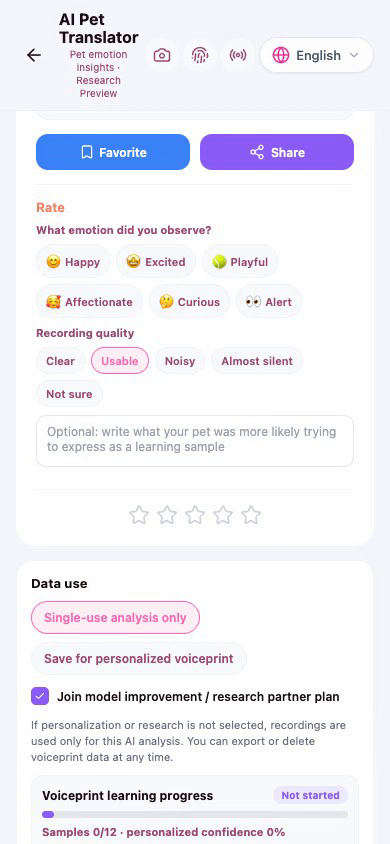
Entry: the relevant feature entry
Users can choose "Pet to Human" or "Human to Pet" mode and use:
- Recording and voice waveform.
- Camera or upload images.
- Multi-frame photos and context descriptions.
- Selected pet profiles.
- Emotion spectrum, translation history, and favorites.
- TTS playback, share cards, and feedback.
Translation results can use witty, gentle, or dramatic human language, such as interpreting continuous barking as "urgent intelligence." The core of this capability is interaction and emotional value. Currently, it should be clearly marked as entertainment/research preview, not a scientifically validated animal language translator.
Users can also provide feedback on pet reactions: approaching, body relaxed, tail soft, vocalizing again, actively playing, no obvious reaction, or avoiding. The system generates a reaction report based on this to help users observe rather than prove the model "understood the pet." If obvious health risk terms appear in the context, it should transition to health caution prompts.
9.3 AI Pet Vet
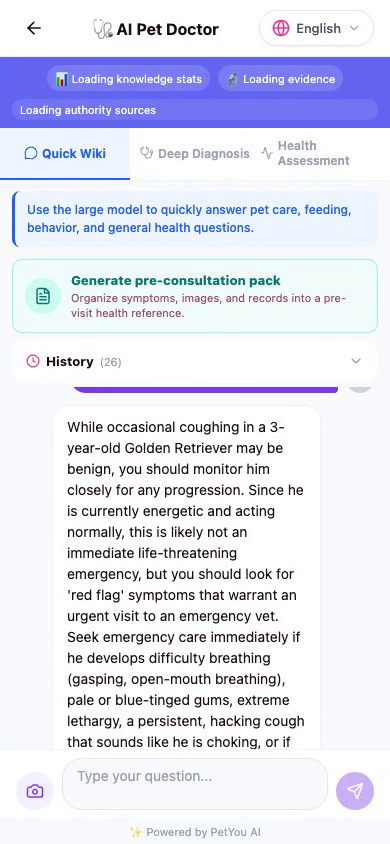
Entry: the relevant feature entry
AI Pet Vet consists of three main modules:
- Quick Q&A: Query common diseases, diet, care, behavior, and first aid knowledge.
- In-depth Diagnostic Assistance: Structured analysis of symptoms and context provided by users, emphasizing risks and next observation steps.
- Health Assessment: Generate health overview based on pet profile and user-provided information.
The page also includes knowledge sources, history, favorites, sharing, and Agent entry. Health results must focus on "reference, risk alerts, information to record, when to seek offline medical care"; they cannot output definitive diagnoses, treatment plans, or prescription commitments.
9.4 AI Personality Profile and Art Portrait
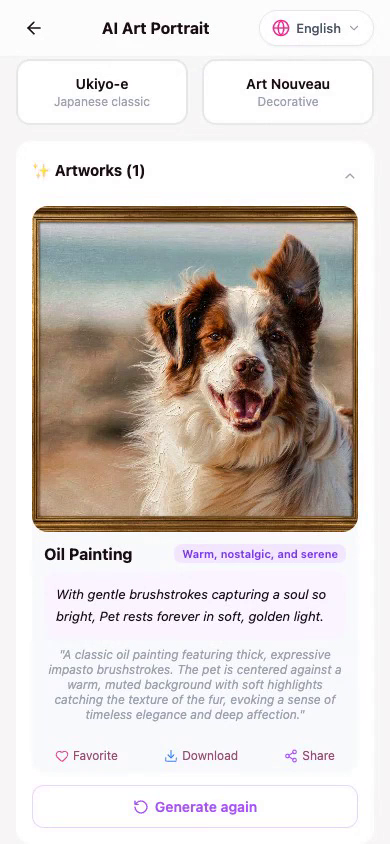
Users upload several photos, supplement breed, age, and personality keywords, and AI can generate:
- Pet personality profile.
- Pet's inner monologue.
- Personality analysis and interaction advice.
- Fun career inclinations or role settings.
- Oil painting, anime, cyberpunk, and other artistic style portraits.
Personality profiles are the entry point for pet digital identity and social expression, while art portraits are shareable social assets. Users can preview, favorite, share, and enter portrait purchase or derivative production flows in supported scenarios. Commercial copyright, brand licensing, person/pet portrait rights, and platform moderation still require separate confirmation.
9.5 AI Pet Song
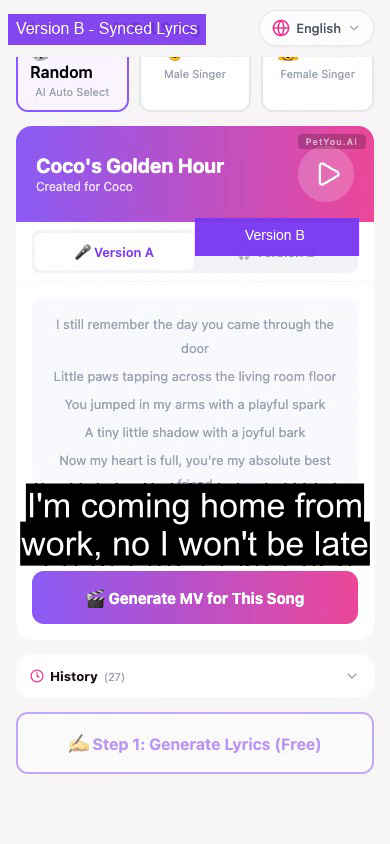
Users fill in pet name, personality, and mood, select styles such as pop, rock, classical, children's song, folk, or hip-hop, then choose emotions such as happy, gentle, touching, funny, lyrical, or passionate. The system supports automatic, male voice, and female voice options.
The page includes lyric generation, song generation, quota alerts, history, audio playback, synchronized lyric highlighting, favorites, sharing, purchase/restore, and limitation status. When long tasks or insufficient quota occur, clear feedback must be displayed; in-progress status should not be written as completed.
9.6 AI Pet MV
Users can upload up to 9 images, choose AI-generated songs or custom audio, then select daily, sports, romantic, holiday, funny, and other styles, set automatic, push-pull, pan, orbit, or follow camera movements, and configure duration, opening credits, and highlight segments.
The MV process is divided into three stages: preparation, generating, and result. Generation is a long task; the page needs to display status, progress, failure/retry, video playback, history, favorites, and sharing. Entering the queue should not be described as "completed immediately."
9.7 AI Pixel Digital Pet
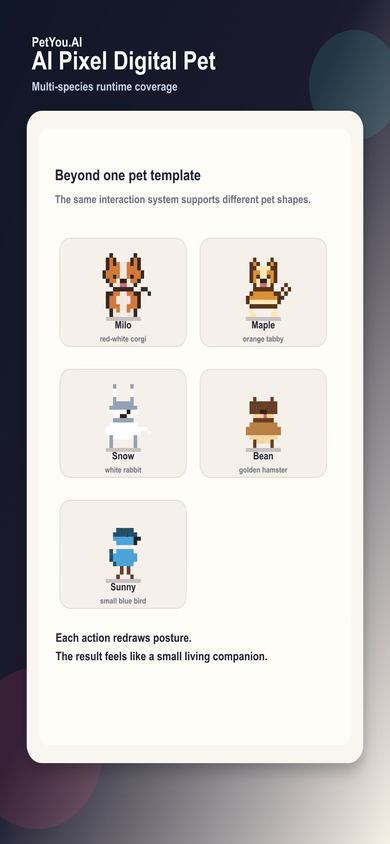
The pixel digital pet is the most direct companion entry point in the Digital Twin Layer. Users can hatch and select avatars and set them as global floating companion avatars. Current implementation includes local life states:
- Mood.
- Hunger.
- Cleanliness.
- Energy.
- Intimacy.
- Experience and visit continuity.
- Feeding, cleaning, training, talking, and petting interactions.
- Dragging floating position.
These states currently focus on local persistence and global component interaction; they cannot automatically equate to complete cloud-based digital twins or real pet physiological data.
9.8 AI 3D Model and Virtual World
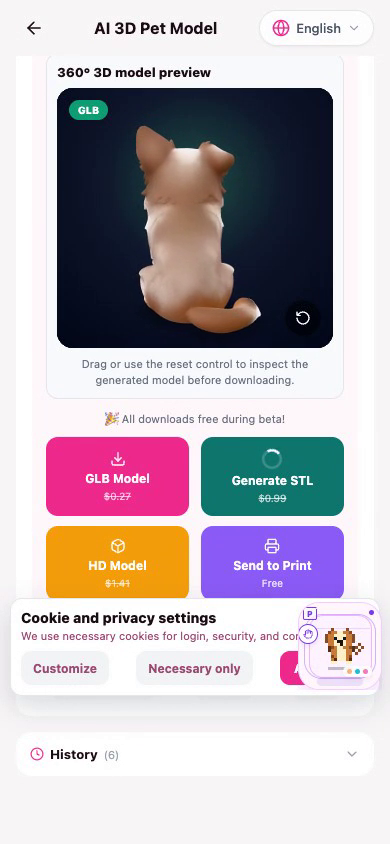
AI 3D Model transforms pet photos into viewable three-dimensional assets; 3D World, Pet 3D World, Virtual Paradise, and other world entries are responsible for display and interaction. Together, they form the experience that "pets don't just exist in a single photo."
Current usage requires attention to: photo quality, generation task status, model service availability, device performance, and build environment. 3D pages should not describe placeholder models or loading states as truly completed digital pet assets.
9.9 AI Broadcast Radio
Broadcast Radio provides four host styles: Corgi Gossip, Philosophy Cat, Hip-Hop Parrot, and Health Hamster. Users can:
- Generate pet-themed programs.
- Select one of 16 languages.
- Use Google Cloud Text-to-Speech for playback.
- Play, pause, next episode, and view history.
- Favorite, share, and make listener calls.
- Use voice recognition in browser, with text input fallback on native.
Program content is AI-generated; voice services and network status may cause generation, playback, or call capabilities to degrade.
9.10 AI Recipe and Training
The recipe page generates recommendations based on pet profile, dietary goals, health context, and user preferences, and supports recipe details. The training page and the relevant feature entry route system support creating plans, viewing plans, daily training, videos, and behavior guidance.
These features transform AI suggestions into "small tasks that can be completed today," but should not turn generic content into medical prescriptions or behavioral therapy plans for pets.
9.11 AI Content, Short Video, and Memes
- Content Creation: Upload photos, input themes, generate multiple versions of titles, captions, stories, and hashtags.
- Short Video: Select warm, funny, action, retro, Vlog, or MV styles, generate scripts, scenes, music, and tags, then enter video generation.
- Memes: Support 8 styles and 6 emotions, can add context text, also try dynamic video mode, download, favorite, and share.
The unified value of AI creation tools is lowering the expression threshold, allowing ordinary users to turn pet daily life into shareable, memorable, and interactive content.
10. Pet Tab: Pet Center and Care Management
Routes: the relevant feature entry; Medical overview compatible route: the relevant feature entry?tab=medical Product Responsibility: Transform pet relationships from "content objects" into manageable, trackable, actionable life archives.
The Pet Center includes six tabs: Pet Walking & Boarding, Adoption Center, Feeding, Medical Health, Pet Mall, Achievement System. The "Pet Mall" tab records the source and then directly enters the relevant feature entry instead of re-implementing product pages within the Pet Center.
10.1 Pet Walking & Boarding
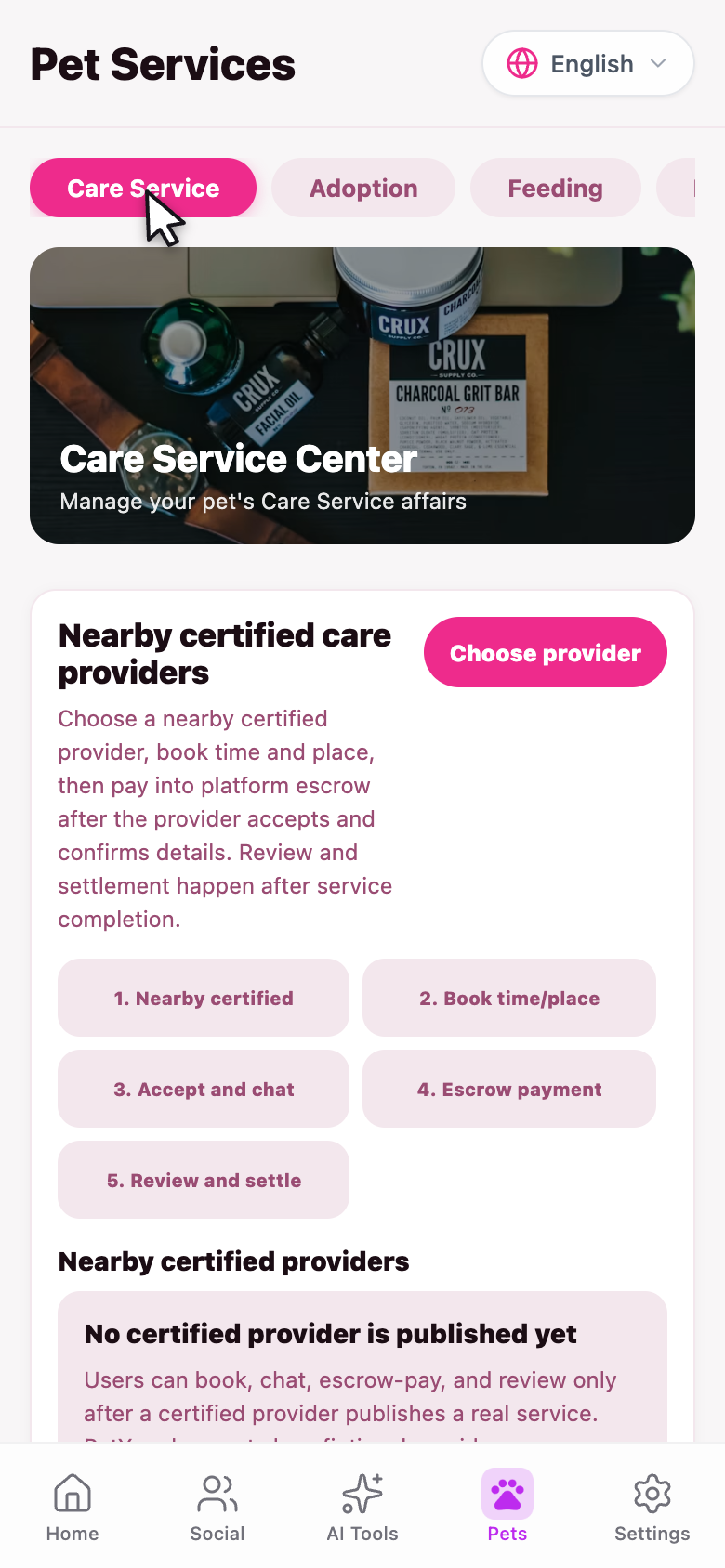
Entry points:
- Pet Certification:
the relevant feature entry - Pet Walking & Boarding:
the relevant feature entry - My Bookings:
the relevant feature entry
The standard flow is:
  → Choose time, location, and service content
  → Platform escrow payment
  → Service completed
  → User reviews
  → Settlement
Current pages clearly distinguish real data from test/sample data. When no real service supply exists, lists cannot be filled with fictional personnel, ratings, inventory, or payment statuses.
10.2 Adoption Center
Entry points:
- Pet List:
the relevant feature entry - Profile:
the relevant feature entry - Post for Adoption:
the relevant feature entry - Adoption Applications:
the relevant feature entry - My Adoption Posts:
the relevant feature entry - My Applications:
the relevant feature entry
The Adoption Center displays public adoption information. Users can view pet basic information, adoption requirements, and application status. Application records support filtering by all, pending, approved, and rejected. When pending, users can contact the rehoming party within allowed boundaries; after approval, users can publish related community content.
The core of the Adoption Center is not "quick transactions," but rather:
- Matching pets with suitable family conditions.
- Helping applicants understand long-term care responsibilities.
- Allowing rehoming parties to retain screening and confirmation rights.
- Making application status and communication records trackable.
10.3 Feeding and Stray Animal Support
Entry points:
- Feeding Diary:
the relevant feature entry - Smart Restock Recommendations:
the relevant feature entry - Support Feeding:
the relevant feature entry
The Feeding tab is used to record feeding actions, supply needs, and support behaviors for stray or community animals. It can connect with Shopping Agent, Nutrition Agent, and local merchants to help users find more suitable food and supplies.
Currently, it should be described as supply and action support, and should not default to expanding into already-completed cryptocurrency, RWA, automatic donation, or fund custody systems.
10.4 Medical Health
The Medical Health tab uses the medical capability directory to manage the open status of different functions and embeds medical scenario Agents. See the next chapter for the specific directory. Users can view here:
- AI Pet Doctor.
- Emergency entry.
- Nearby hospitals and pharmacies.
- Medical records.
- Home health log.
- Physical examination and deworming/vaccination reminders.
- Medical knowledge base.
- Insurance education.
- Prescription records.
- Conditionally open appointment, institution enrollment, and follow-up telemedicine capabilities.
10.5 Pet Mall Entry
The mall tab in the Pet Center provides quick entry to product discovery and supply networks. It is not an "in-Pet-Center payment page"; shopping, payment, and subscriptions are handled separately in the mall and payment center.
10.6 Achievement System
Entry points:
- Achievement Center:
the relevant feature entry - Challenge Tasks:
the relevant feature entry - Leaderboard:
the relevant feature entry
The Achievement System converts care, training, feeding, community participation, creation, and exploration into long-term feedback. It can reinforce the habit of "continuous pet ownership," but leaderboards should not encourage dangerous feeding, excessive training, or unauthorized public sharing.
11. Pet Profile, Pet Card, and Health Records
11.1 Pet List and Adding
Pet List: the relevant feature entry Add Pet: the relevant feature entry
Users can fill in:
- Pet avatar.
- Name.
- Species: dog, cat, rabbit, bird, hamster, or other.
- Breed, gender, age, weight.
- Description and personality.
- Optional adoption posting information, location, and requirements.
11.2 Pet Details
Pet details and edit routes include the relevant feature entry, the relevant feature entry, etc. It is the connection point between pet profile, timeline, health, feeding, training, adoption, and creation. From here, users should be able to:
- Switch pets.
- View profile completeness.
- Edit basic information.
- Enter health records and reminders.
- Enter AI portraits, 3D models, and creation.
- View pet growth and interaction history.
- When allowed, enter adoption or community-related operations.
11.3 Memory Timeline
AI Memory Page: the relevant feature entry
The memory page reads the timeline from the user memory interface, supports filtering by year, generates memory video scripts, and provides history, favorites, and sharing. Some statistical summaries in the current public release may be presentation-layer inferences or placeholder data, so externally it should be described as "memory timeline and AI memory scripts," without directly promising that every number comes from complete sensors or full trajectory data.
12. Medical Health System
12.1 Medical Capability Directory
The medical module controls the distinction between "displayable, usable, and bookable" through a capability directory. Current capabilities can be summarized as:
| Capability | Entry | Current Status | Description |
|---|---|---|---|
| AI Pet Doctor | the relevant feature entry | ✅ Implemented user capability | Quick Q&A, health reference, history and evidence prompts |
| Emergency | the relevant feature entry | ✅ Implemented user capability | Real POI, phone numbers, and navigation, depends on location/region |
| Nearby Veterinarians | the relevant feature entry | ✅ Implemented user capability | Map POI and institution directory, appointments require further confirmation |
| Pet Pharmacy | the relevant feature entry | ✅ Implemented user capability | Real location search and filtering |
| Medical Records | the relevant feature entry | ✅ Implemented user capability | View visit, physical examination, vaccine, treatment, surgery records |
| Home Health Log | the relevant feature entry | ✅ Implemented user capability | User-initiated entry and management |
| Physical Examination Reminders | the relevant feature entry | ✅ Implemented user capability | Links with pet profile and reminders |
| Medical Knowledge Base | the relevant feature entry | ✅ Implemented user capability | Knowledge queries and educational content |
| Insurance Education | the relevant feature entry | ✅ Implemented user capability | Explanation of coverage, waiting periods, exclusions, etc. |
| Prescription Records | the relevant feature entry | ✅/🟡 | Read authoritative records; prescribing is subject to capability control |
| Video Consultation | the relevant feature entry | 🚫 Temporarily unavailable/Planned | Page directory exists, but capability is closed or not yet connected |
| Medicine Delivery | the relevant feature entry | 🚫 Temporarily unavailable/Planned | Requires fulfillment, prescription, and delivery capabilities |
The system adopts a fail-closed principle for capabilities such as institution enrollment, appointments, medical record writing, PDF documents, prescriptions, video consultations, and delivery: when capabilities are not explicitly enabled, they cannot be assumed available.
12.2 Nearby Medical Institutions

Entry: the relevant feature entry
Users can:
- Authorize location and view nearby medical POI.
- Switch between map and list views.
- Filter by all, map, verified, pharmacy, verified pharmacy.
- View phone numbers, navigation, favorites, and sharing.
- View official public facilities, pet-friendly dining, or licensed institution resources in specific regions.
Institution pages are based on real data and official sources. Without location or regional data, pages should request users to select a region or display a restricted state, rather than generating fictional "nearby hospitals."
12.3 Medical Records
Entry: the relevant feature entry
The records page contains two top-level views: visit records and appointments, supports filtering by all, physical examination, vaccine, treatment, surgery, and sorting by newest/oldest. Record details can be favorited, shared, or supplemented with information.
12.4 Emergency Boundaries
The emergency page aims to shorten the time from "discovering risk to contacting professional institutions," including:
- Important symptom prompts and behavioral recommendations.
- Nearby hospitals, phone numbers, and navigation.
- Entry to medical triage or Agent.
- Clear disclaimers and professional medical care reminders.
It is not a remote emergency diagnosis and cannot replace local veterinary emergency services.
12.5 Insurance Education
The insurance page helps users understand: coverage scope, deductibles, waiting periods, exclusions, material preparation, and claims issues. The Insurance Agent can explain terms but does not promise underwriting, pricing, claim amounts, or review results.
13. Maps, Tracks, and Local Connections
13.1 Map Entry Points
Main routes include:
the relevant feature entry: Map homepage and action entry.the relevant feature entry: Map exploration.the relevant feature entry: Main map interface.the relevant feature entry: Pet tracks and footprints.the relevant feature entry: Track details.the relevant feature entry: Pet-friendly locations.the relevant feature entry: Geographic memory.the relevant feature entry,the relevant feature entry: Map community content.the relevant feature entry: Geofencing.the relevant feature entry,the relevant feature entry,the relevant feature entry: Track management and recording.
13.2 Regions and Map Services
Maps use different map services and POI sources based on region. Users must authorize location access for the system to provide nearby results; without permission, manual region selection or universal mode can be used, but the default region must not be treated as the user's actual location.
13.3 Tracks and Geographic Memory
The track feature records walking paths for users and pets, providing capabilities to save, reopen, view details, and connect with community and memory. Geofencing can serve as reminders and safety assistance, but cannot replace professional pet trackers or real-time monitoring devices.
13.4 Map and Agent Connection
When the Agent returns "nearby pet hospitals," "nearby stores," or "suitable walking locations," the final results must be validated through map/institution services. The Agent is responsible for understanding and filtering, while the map is responsible for displaying actual locations, phone numbers, navigation, and sources.
14. Pet Services and O2O Loop
14.1 Service Types
Pet services page: the relevant feature entry
Currently includes:
- Dog walking.
- Daycare.
- Boarding.
- Service details.
- My appointments.
- Entry point for service process monitoring or companion information display.
14.2 Supply Authenticity
- Complete identity, qualification, service capability, and location verification.
- Configure service types, pricing/rules, scheduling, and capacity.
- User initiates service or booking request.
- Platform records payment, service status, and reviews.
- Settlement after completion, and service quality data accumulation.
Booking status cannot be directly displayed as "confirmed" after the user clicks submit.
- Institution information.
- Locations.
- Team members.
- Qualifications.
- Service items.
- Scheduling.
- Capability toggles.
- Appointments.
- Medical records.
- Adoption content.
15. Mall, Product Discovery, and Payment
15.1 Pet Mall
Entry: the relevant feature entry
The mall currently focuses on "product discovery and supply connection," with main capabilities including:
- Personalized CPS recommendations.
- Pet species identification: cats, dogs, small pets, birds, aquatic, reptiles, etc.
- User region and delivery country selection.
- Season, pet profile, and scenario recommendations.
- Product search and semantic search.
- Image search.
- Categorization, sorting, and feedback.
- Product details, sharing, and favorites.
- Unified display of local O2O search results and external candidates.
Product feeds use pagination and loading states; empty lists must not generate fictional products.
15.2 Product Details and External Boundaries
Entry: the relevant feature entry
Products may come from PetYou internal supply or from cleaned and validated external candidates. External redirect links must be HTTPS addresses trusted by the server and validated for region and delivery eligibility.
Before clicking on external products, users should know:
- Pricing and inventory are determined by the external platform.
- Delivery, returns, and after-sales are determined by the external platform.
- PetYou does not automatically pay, place orders, or upload unnecessary information.
- Users can save or share first, then decide whether to enter the external platform.
15.3 Payment Center
Entry: the relevant feature entry
The payment center is separate from the mall and handles:
- Account balance or payment status.
- Recharge/withdrawal entry (if open in current environment).
- Transaction history.
- Payment methods.
- Stripe-managed payment methods.
- Payment success, failure, refund, and billing pages.
PetYou does not store user bank card details at the application layer. Payment capabilities are subject to platform, region, service configuration, and external payment console control.
15.4 Membership and Subscriptions
Entry: the relevant feature entry, the relevant feature entry, the relevant feature entry
Membership tiers include entry points for Free, Plus, Pro, and Ultra levels, supporting current membership status reading, purchase restoration, and plan selection. Actual pricing and benefits are determined by current platform configuration, native IAP, or corresponding payment systems; when configuration does not exist, controls should display controlled build or unavailable state.
Membership does not equal unlimited use of all AI capabilities. AI music, video, images, and models may be separately subject to quotas, task queues, regions, and model service status.
16. Settings Tab: Account, Privacy, and System Controls
Route: the relevant feature entry
16.1 Appearance and Language
- Current language switching and internationalization settings.
- Display capabilities for Simplified Chinese, Traditional Chinese, English, and other locales depend on resources and build configuration.
- Dark/light theme toggle.
- After language change, page titles, buttons, prompts, and error states should change synchronously.
16.2 Personal Profile and Membership
- User avatar, display name, and membership status.
- Unauthenticated users enter login page.
- Membership status loading, unavailable, and loaded states need to be distinguished.
- Personal homepage and pet management maintained as separate entries.
16.3 My Content
| Function | Purpose |
|---|---|
| My Works | Unified view of AI images, songs, videos, models, and creation history |
| Notification Center | System, social, service, reminder, and task notifications |
| My Reminders | View Agent, medical, and care reminders |
| Favorites | Manage community, products, works, locations, and recommendations |
| Chat History | View Agent or user chat history |
16.4 Pet Management
- My Pets
the relevant feature entry. - Pet list, profiles, editing, health, and memory entry.
- Control which information can be used by AI and social features through personal profile.
16.5 Payment, Onboarding, and Ecosystem Identity
- Payment and Subscription
the relevant feature entry. - Referral Center
the relevant feature entry. - KOL/Influencer Application
the relevant feature entry.
16.6 Privacy, Security, and Notifications
- Notification Settings
the relevant feature entry. - Usage and Billing
the relevant feature entry. - Security Settings
the relevant feature entry. - Data and privacy controls belong to the account security/privacy domain.
- Cookie preferences support three categories: necessary, functional, and analytics.
- Logout requires confirmation.
Necessary cookies are always retained; functional and analytics cookies are chosen by users and written to local preferences. Account deletion, privacy export, data cleanup, and third-party permissions should be based on actual service capabilities and platform policies.
16.7 About PetYou
The About page and project description page introduce:
- PetYou is an AI-driven global pet ecosystem platform.
- Contact email:
support@petyou.ai. - Official website:
https://www.petyou.ai. - Overall positioning of AI, community, health, creation, and service ecosystem.
Also includes AI model descriptions, system version, privacy policy, terms of service, and project information entry.
17. Recommended Summary for External Introduction
The following paragraph can be used as the summary for official websites, project documentation, pitch materials, and user manuals:
18. Conclusion: What PetYou Is Truly Building
PetYou's real product assets are not just a single AI tool, a community page, or a marketplace entry, but the long-term consolidation of the following five relationships:
- The relationship between humans and pets: Helping users better understand and care for their pets.
- The relationship between pets and digital identity: Giving pets continuous, memorable, and shareable digital profiles.
- The relationship between users and community: Transforming pet ownership from individual life into a community with boundaries and security.
- The relationship between AI and the real world: Ensuring AI does not remain in conversation but helps users complete the next real action.
Ultimately, PetYou's core competitiveness should be expressed as:
Seeing the pet's personality, hearing the pet's emotions, remembering shared time, finding real help, and respecting the user, the pet, and the real world before and after every action.